
One link. A complete handoff.
Bring your files into one transfer, add a title and a message, then share a single link with your recipient.
From your first draft to the final deliverable. Send large files with a private link and keep your work moving.
Bring your files into one transfer, add a title and a message, then share a single link with your recipient.
Protect a transfer with a password when the work calls for it. Share the password separately with the people who need access.
Choose an expiry from the options available to your plan. Stop new access sooner by revoking the transfer from your workspace.
Find transfers, check their status and review download authorizations in your workspace. Keep track of what is available and what has expired.
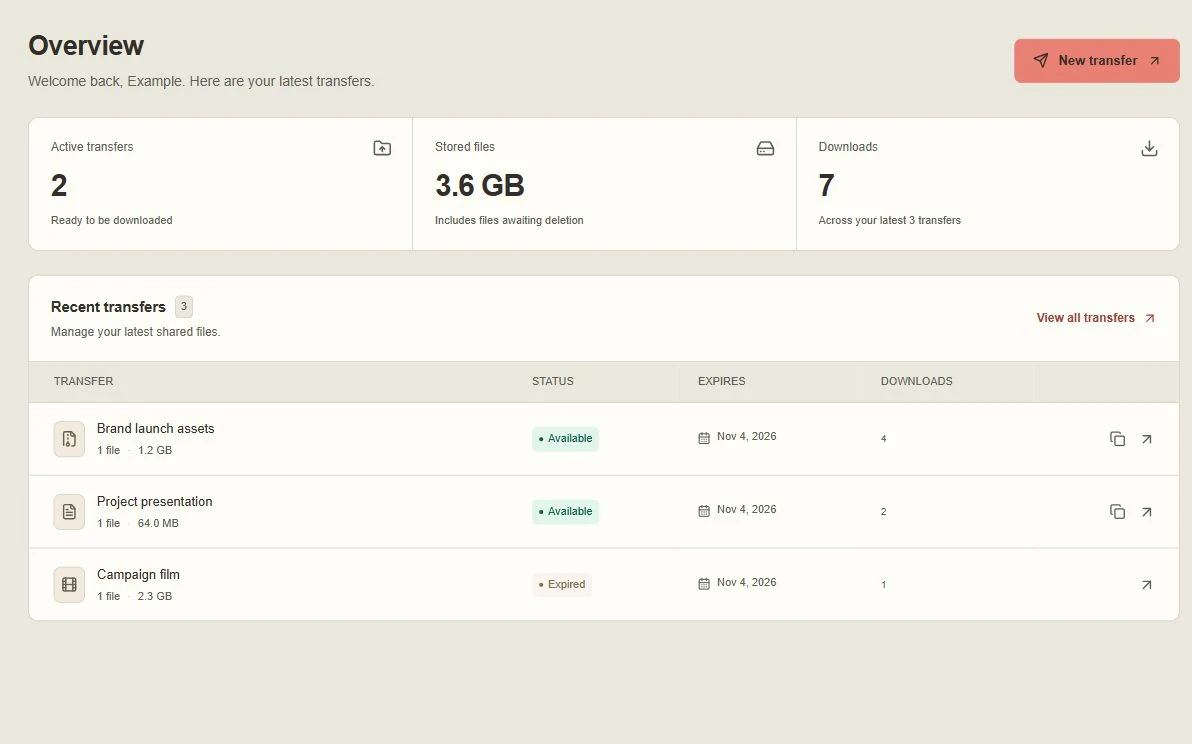
Start with a clear view of active transfers, stored files and recent handoffs. Download counts record authorizations to download individual files.
Sign in with your Zuno account. Choose your files and give the transfer a title, message and expiry. Add a password if you need one.
Keep the upload tab open while your files are sent and verified. Pause, resume or retry within that tab when you need to.
Copy the transfer link and send it to your recipient. Review the transfer in your workspace, or revoke it to stop new access.
A few useful details for a smoother handoff.
No. Your recipient can open the sharing link and download the complete ZIP without signing in. If you protected the transfer, they will need the password. Anyone with an unprotected link can access the transfer until it expires or is revoked.
File size, transfer size, storage and expiry allowances depend on your plan and the service limits. Check the allowances shown in your workspace before uploading, or compare plans on the pricing page.
New download access stops when the transfer expires or is revoked. A download link that was already authorized may remain usable until its short validity window ends. Revoking access cannot remove files someone has already downloaded.
Folder selection adds the files inside the folder without preserving their relative folder paths. New transfers are checked for viruses, then packaged into one ZIP before storage. Recipients download the complete ZIP; individual file selection is not available. Scanner and service limits are shown before uploading.
Share your files through a private link.